New · Free

See your site the way AI crawlers do. Then fix it.

Tom's AI Discovery Kit is a free Windows tool that crawls your site, scores its AI readiness, and generates the discovery and crawler-control files that actually matter — robots.txt AI rules, sitemaps, structured data, and the llms.txt family included. No account, no cloud, nothing uploaded.

Single portable EXE Zero dependencies No account Runs locally — nothing uploaded
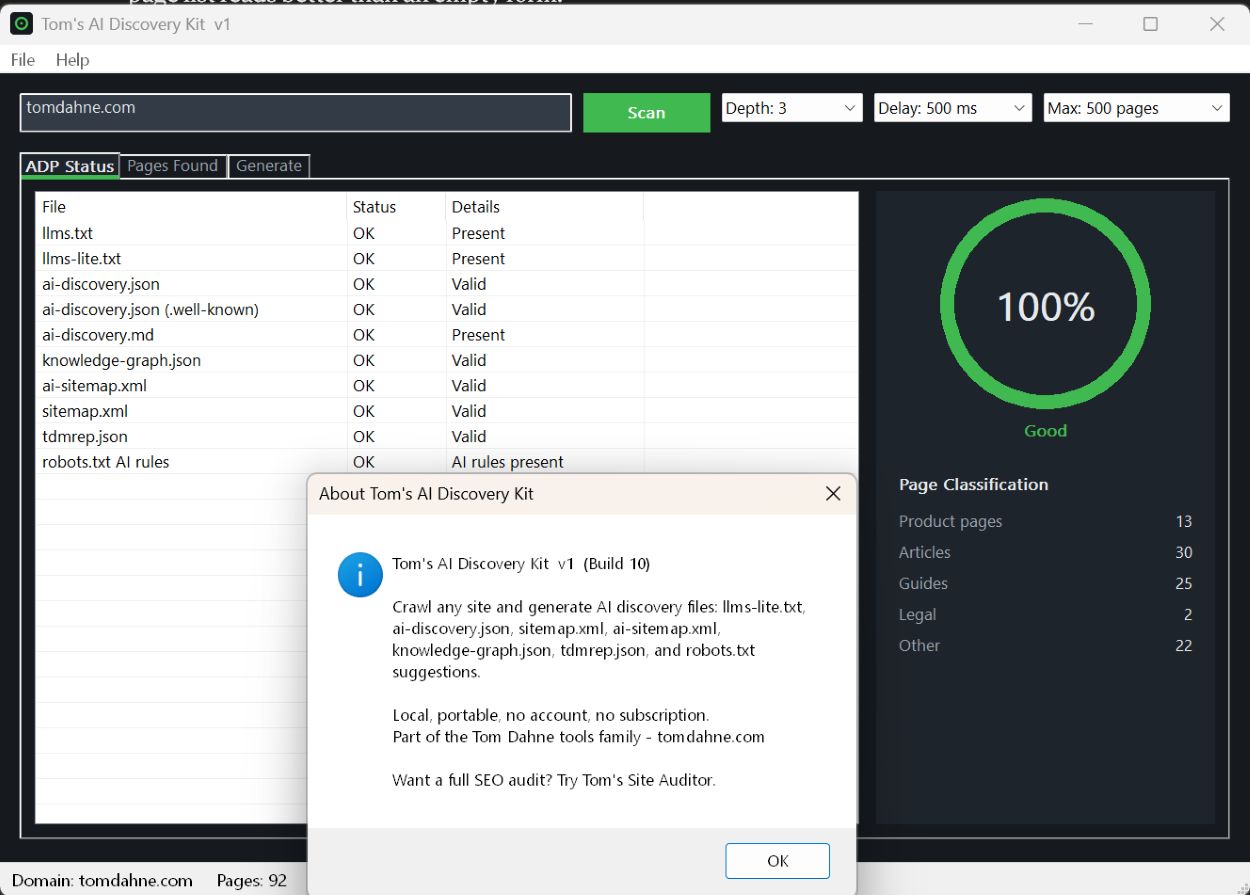
Tom's AI Discovery Kit ADP Status tab showing a 100% AI-readiness score, the file-by-file discovery check table, and page classification counts

Scan a site and see exactly which AI-discovery and crawler-control files it has, which it is missing, and a single readiness score.

9
Discovery files generated
6
Page types classified
0
Accounts or cloud
1
Portable EXE

What it does

It audits the signals AI crawlers genuinely consume, scores where you stand, and generates a clean, reviewable package you can upload as-is.

%

AI-readiness score

A light crawl checks your site against the AI-discovery and crawler-control endpoints and gives you one clear percentage — so you know where you stand before you change anything.

ADP endpoint audit

Probes the standard endpoints — robots.txt AI rules, sitemap.xml, ai-discovery.json, llms.txt and the rest — and tells you exactly which you already have, which are missing, and which are misconfigured.

robots.txt AI-bot rules

Generates explicit allow/deny rules for the AI crawlers that actually respect robots.txt — GPTBot, ClaudeBot, Google-Extended, PerplexityBot and more. Merges into an existing file additively, never overwriting your own blocks.

Structured data & knowledge graph

Builds a schema.org structured-data starter and a knowledge-graph.json from what it finds on your pages — the markup AI engines actually parse when they read your HTML.

Training opt-out (tdmrep)

Declares your text-and-data-mining position in a standard tdmrep.json, tied to your training choice so robots.txt and tdmrep agree. Your stance, stated unambiguously.

Sitemaps

Produces a clean sitemap.xml and an ai-sitemap.xml from the crawl, with per-URL last-modified dates — the discovery file AI crawlers fetch most after robots.txt.

The llms.txt family — honestly

Generates llms.txt, llms-lite.txt, ai-discovery.json and ai-discovery.md too — included as forward-looking extras, with a plain note on what current adoption data actually shows.

Page classification

Labels every page it finds — product, article, guide, utility, legal, or index — so the generated files describe your site accurately instead of treating every URL the same.

🔒

Private by design

The crawl runs from your machine and the package is written to a folder next to the EXE. No account, no telemetry, nothing uploaded. The only network traffic is the crawl of the site you point it at.

An honest word on llms.txt. Server-log evidence — including my own — shows the major AI crawlers reach sites through robots.txt, sitemaps, and your HTML, and rarely fetch the llms.txt-style files. This kit leads with the signals that work and includes the convention files as cheap, static insurance — not as a magic visibility lever. Read the data →
A walk through the kit

Three tabs take you from a URL to an upload-ready package.

Tom's AI Discovery Kit ADP Status tab — AI-readiness score gauge, the discovery-file check table, and page classification counts

ADP Status

The first tab after a scan. Every discovery and control file is marked found, missing, or blocked, alongside your AI-readiness score and a breakdown of the pages found by type — product, article, guide, utility, legal, or index.

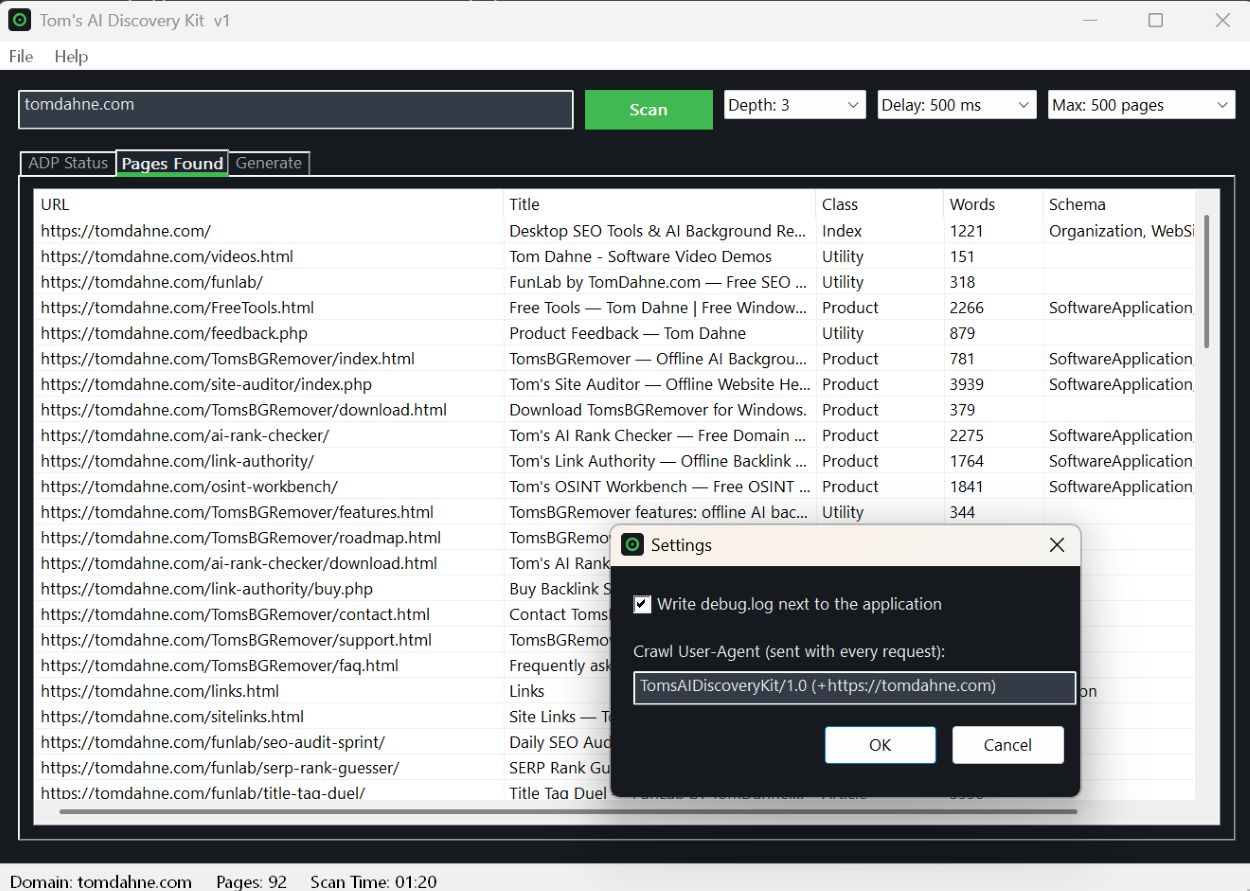
Tom's AI Discovery Kit Pages Found tab — a sortable list of crawled pages with title, classification, word count, and detected schema types

Pages Found

Every page the crawl reached, with its title, classification, word count, and the schema.org types detected on it. Sort by any column to see how your site is structured and where the schema gaps are.

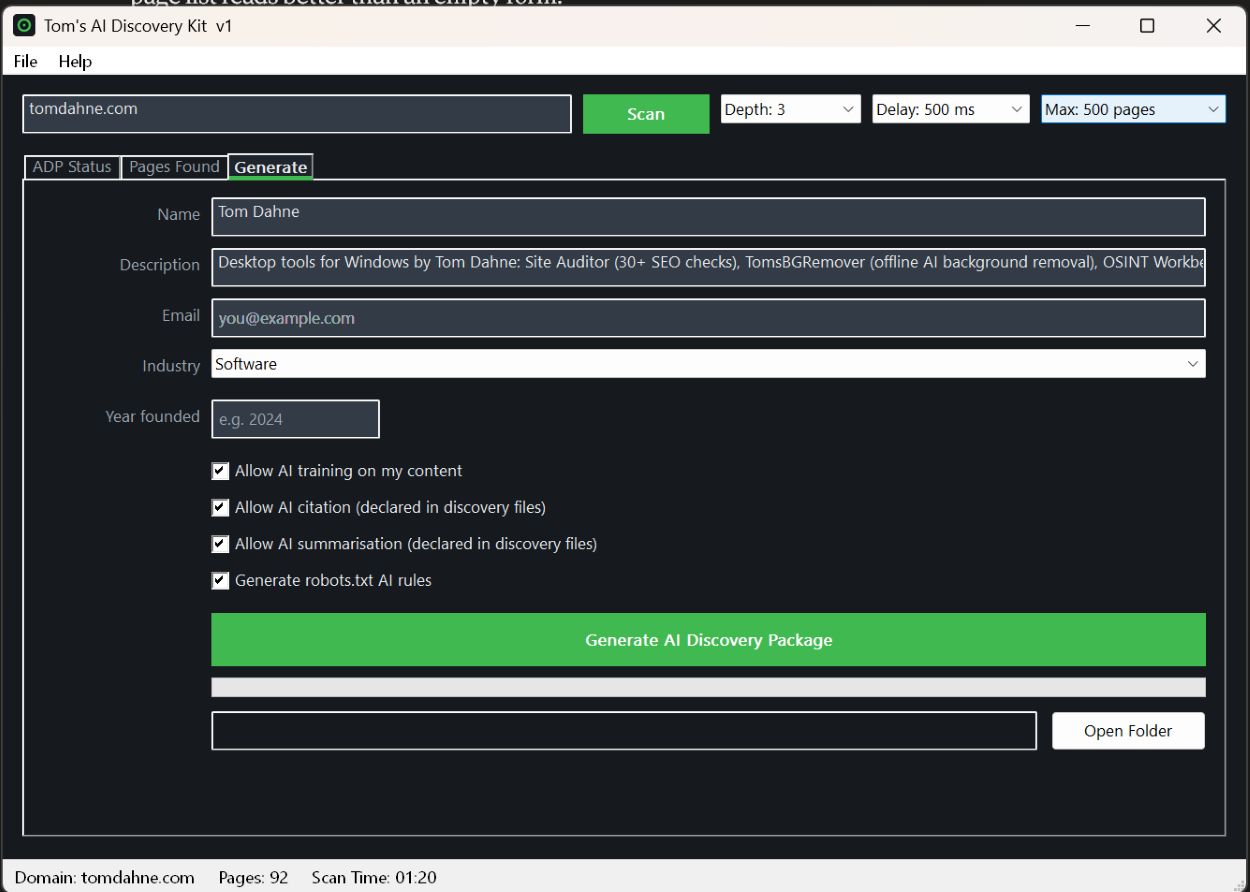
Tom's AI Discovery Kit Generate tab — site details, AI training, citation and summarisation permission checkboxes, and the Generate AI Discovery Package button

Generate

Confirm your details, set your AI training, citation and summarisation permissions, then generate. One click writes the full package and a zip — with a README.txt and an upload-map.txt telling you exactly where each file goes on your server.

How it works

Four steps from a cold URL to a reviewed, upload-ready set of files.

01

Scan

Point it at your site. A light crawl maps your pages and checks which discovery and control files already exist.

02

Score

Read your AI-readiness score and the file-by-file status. Now you know what's missing instead of guessing.

03

Configure

Confirm your details and set your training, citation and summarisation permissions — all on one screen.

04

Generate

One click produces the package and zip. Review the files, back up anything you're replacing, and upload.

What's in the package

Every file is plain text or JSON, safe to read, and yours to review before it goes anywhere near your server.

FileWhat it is
robots.txt.NEWAI-crawler allow/deny rules — compare with your existing robots.txt and back up first
sitemap.xmlStandard sitemap from the crawl — review against any CMS/plugin sitemap first
ai-sitemap.xmlAI-oriented sitemap, ready to upload
ai-discovery.jsonMachine-readable site summary and permission declarations
ai-discovery.mdHuman-readable companion — review then upload
knowledge-graph.jsonStructured-data starter — add relationships manually
llms-lite.txtCurated content map for the llms.txt convention
tdmrep.jsonText-and-data-mining reservation — goes in .well-known/
README.txt & upload-map.txtDeployment guide and a file-to-server-path reference

The technical bit

Built to the same rules as every other tool on this site: offline-first, zero dependencies, single portable EXE.

Platform

Windows 10 and 11, x64. Built with C++17 and the Win32 API. No MFC, no Qt, no frameworks, no .NET.

Storage

No database. Settings live in an INI file next to the EXE; the generated package is written to an output\ folder beside it.

Network

WinHTTP for the crawl and endpoint checks. No third-party HTTP libraries, no telemetry of any kind.

Rendering

Owner-drawn Win32 UI with a dark theme, DPI-aware. Consistent look without external UI toolkits.

Install

None. Unzip and run. Delete the folder to uninstall — nothing is written outside it except the files you choose to upload.

Licence

Free for personal and commercial use. Source not distributed. No warranties.

Download Tom's AI Discovery Kit

Single ZIP. No installer, no account, no subscription. Unzip and run.

Windows 10/11 (64-bit) • Single portable EXE • ~X MB • Updated May 2026

Verify your download
Upload the zip to VirusTotal or Hybrid Analysis to scan it yourself, or check its hash with Tom's Quick Hash Checker.