- Key Takeaway
- A competitor backlink report reveals four types of link sources — editorial, directory, community, and tool links — each requiring a different action. Categorise every linking domain, extract parallel action tracks (quick wins, content production, outreach), and use link gap analysis to find pre-qualified targets that already link to competitors but not to you. The entire workflow runs on free offline tools with no subscriptions.
How to Turn a Competitor Backlink Report Into a Link Building and Content Roadmap
A competitor backlink report is the most information-dense SEO research document you can produce for free. It reveals your competitor's entire distribution strategy — which publications link to them, which directories list them, which communities recommend them, and which content earns them links. This guide shows you how to turn that raw data into a prioritised link building and content roadmap using free offline tools and no subscriptions.
Most people use a backlink checker the wrong way. They type in a competitor's domain, scan the list of linking sites, copy the ones that look useful into a spreadsheet, and then the spreadsheet sits there for three weeks while nothing happens. That's data collection with no plan attached to it. The approach below fixes that.
Why Competitor Backlink Analysis Is Worth Your Time
Competitor backlink research eliminates guesswork from link building. Every site that links to a competitor in your niche has already demonstrated that they cover your topic, accept links or contributions, and are willing to reference tools and content like yours. That's a pre-qualified warm list before you've sent a single email.
Link building from scratch is hard. You're cold outreaching sites that have never heard of you, pitching content to editors who don't know your work, and hoping something sticks. The hit rate is low and the effort is high. Competitor backlink research flips that problem entirely — instead of guessing where to go, you're following a path someone else has already walked.
The other thing most people miss is that a backlink report reveals far more than link opportunities. Guest posts show you the publications they're targeting. Directory listings show you where they're getting citations. Tool roundups show you the categories they're positioning in. Forum mentions show you the communities they're active in. A single backlink report from a direct competitor is one of the most information-dense research documents you can get your hands on — if you know how to read it.
Getting the Data: Free Backlink Checker Without the Subscription
Tom's Link Authority is a free offline Windows desktop tool built from 4.4 billion link connections processed from Common Crawl — the same open web dataset that provided over 80% of GPT-3's training tokens. You download it once, run it on your machine, and your data never leaves your desktop. There's no API call, no subscription, no monthly limit.
The traditional approach to backlink analysis involves paying for a cloud tool — Ahrefs at $99/month, Semrush at $139/month, Moz at $99/month — and exporting whatever they'll give you within your plan limits. The problem with those tools is that the data lives on their servers, the exports are often capped, and you're paying every month whether you use them or not.
Tip: Common Crawl data reflects the most recently processed crawl snapshot rather than live web data. For most backlink research purposes this is ideal — you're looking for established link patterns, not changes from the last 48 hours.
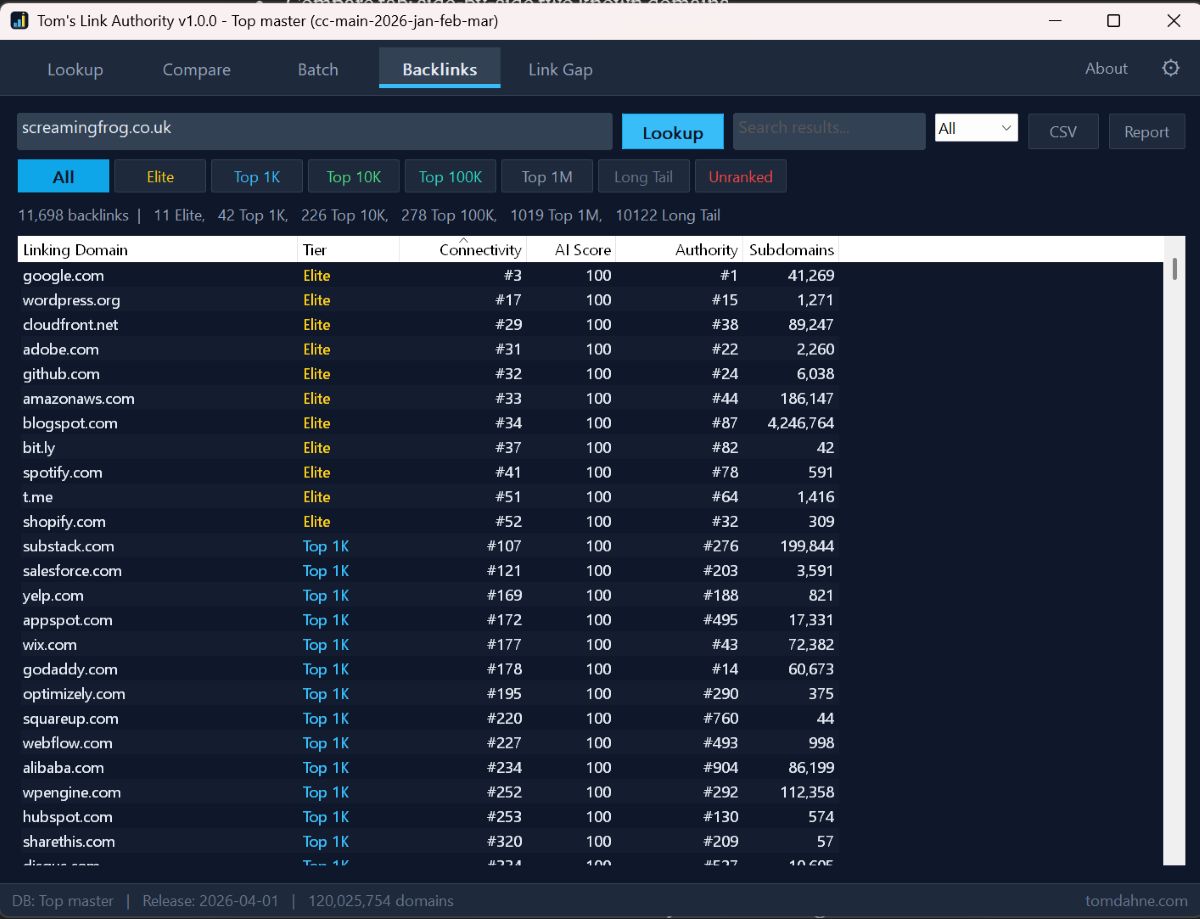
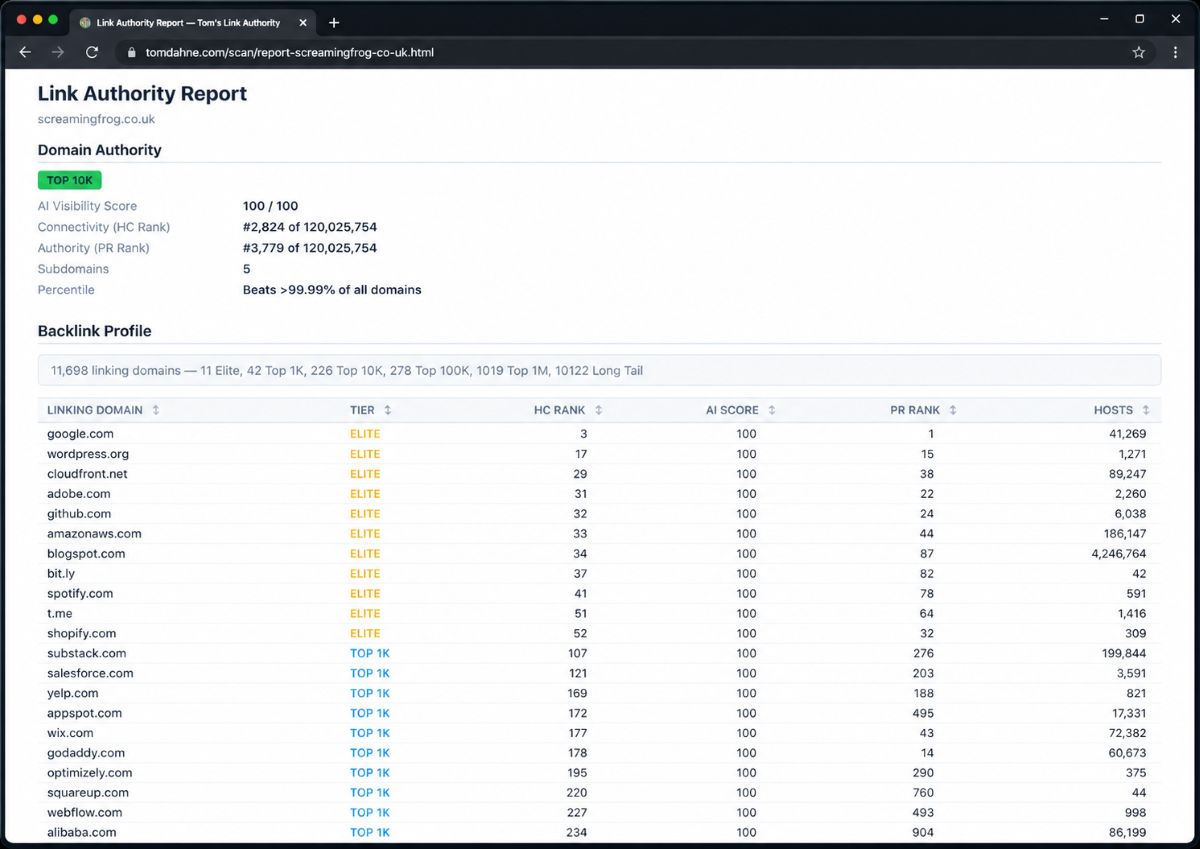
To run a competitor backlink analysis, open Tom's Link Authority, navigate to the Backlinks tab, and enter the competitor's domain. The tool queries the local shard databases — 27 SQLite shards totalling approximately 300 GB of link data — and returns a full list of domains linking to that URL, along with authority scores derived from Harmonic Centrality calculations across the web graph. You can export this as an HTML report, which gives you a sortable, filterable view of the entire backlink profile.
That HTML report is where the real work begins.
How to Read a Backlink Report: The Four Categories That Matter
Every linking domain in a competitor backlink report falls into one of four categories, and each category requires a different response. Resist the temptation to immediately start copying URLs — read the list with a categorisation mindset first.
Editorial and content links are the most valuable. These come from blogs, publications, and resource pages where someone made an active decision to reference your competitor's content. If a publication is linking to your competitor's article about keyword research, they're interested in that topic. They might take a better article, a different angle, or a contribution from you. These are your guest post and outreach targets.
Directory and citation links come from web directories, tool listings, niche directories, and local citation sites. These are usually easier to replicate — most directories accept submissions, and if your competitor is listed there, you can get listed there too. This is the fastest category to action and where you'll often find immediate wins, particularly for free tool directories and software review sites. For managing Directory Submissions you can use Toms Directory Manager.
Community and forum links come from Reddit, Quora, Stack Exchange, niche forums, and community platforms. These tell you where your competitor is active or being discussed. Some of these are earned organically — someone recommended their tool in a thread — and those are gold. They tell you exactly which communities care about problems your tools solve.
Tool and data links are references from SEO tools, checker utilities, and data aggregators — like the bulk DA PA checker at guestpostlinks.net discovered during a recent backlink research session. These sites often provide free tools themselves and link to other tools and resources in the process. They're worth bookmarking as research tools in their own right, not just as link targets.
Turning Each Category Into Action
Each category produces a different type of actionable item. This is where most people stop doing competitor backlink analysis and start actually doing SEO.
Editorial links → outreach list. The question to ask is: what content earned this link, and can I do something better or different? If a DA 45 tech blog is linking to your competitor's "free keyword research tools" roundup, that blog clearly covers SEO tools for their audience. You have free SEO tools. You have a legitimate reason to reach out, offer a contribution, or pitch a follow-up article. Note the site, note the editorial contact or submission page if visible, and add it to your outreach list with context about why it's relevant.
Directory links → submission list. Open each directory listing, check whether there's a submission form or a contact for new listings, and note whether the listing is free or paid. Build a separate directory target list from this process. You'll often find directories you've never heard of that are specifically relevant to your niche — software directories, Windows tools roundups, indie developer resource pages — that don't show up in generic "submit your site" lists.
Note: Not all directories are worth pursuing. Filter by quality signals: Does the site look maintained? Does it have real content beyond the directory itself? Does it have a Spam Score below 30% when checked via a bulk DA checker? If a directory is clearly a link farm, skip it regardless of DA.
Community links → participation targets. Visit the actual thread or post where the mention appeared. Read the context. What problem was the person solving? What was the conversation about? This tells you the exact language and framing your target audience uses when they need what you offer. That framing belongs in your content, your product pages, and your outreach emails. It also tells you which communities are worth becoming genuinely active in — not for spam, but for real participation that builds credibility over time.
Tool links → research toolkit. Visit the tool, understand what it does, and ask whether it's useful for your own research workflow. Some will be useful DA checkers, Spam Score validators, or domain age tools that you can add to your research toolkit. Others will be link targets in their own right — tools that list other tools, comparison pages, or resource roundups you could be included in.
Finding Content Ideas in Backlink Data
Backlinks reveal which content has already earned attention in your niche — and attention is the best proxy for what your target audience actually cares about. This makes a competitor backlink report one of the least obvious but most valuable sources of content ideas.
Look for the pages on your competitor's site that are receiving the most links. These are their strongest content assets. Now ask three questions. First, is there a gap in their coverage — something they haven't addressed that their linking audience would also care about? Second, is their content outdated — can you write a more current, more accurate, or more practical version? Third, is their content pitched at the wrong level — too basic for a technically-minded audience, or too advanced for a beginner who just wants to get something done?
Any of these gaps is a content opportunity. The difference between guessing at content topics and researching them through competitor backlinks is that the latter gives you confirmation that the topic has already earned links. You're not hoping it'll work — you're looking at evidence that it does.
During one recent backlink research session using Tom's Link Authority, a single 500-link competitor report surfaced three distinct content ideas, two directory submission targets that hadn't appeared on any standard list, one free DA checking tool worth bookmarking as a research utility, and a niche SEO community forum where the competitor was being actively recommended. That's several weeks of content and link building work identified in under an hour — without paying for a single API call.
The Link Gap Analysis Angle
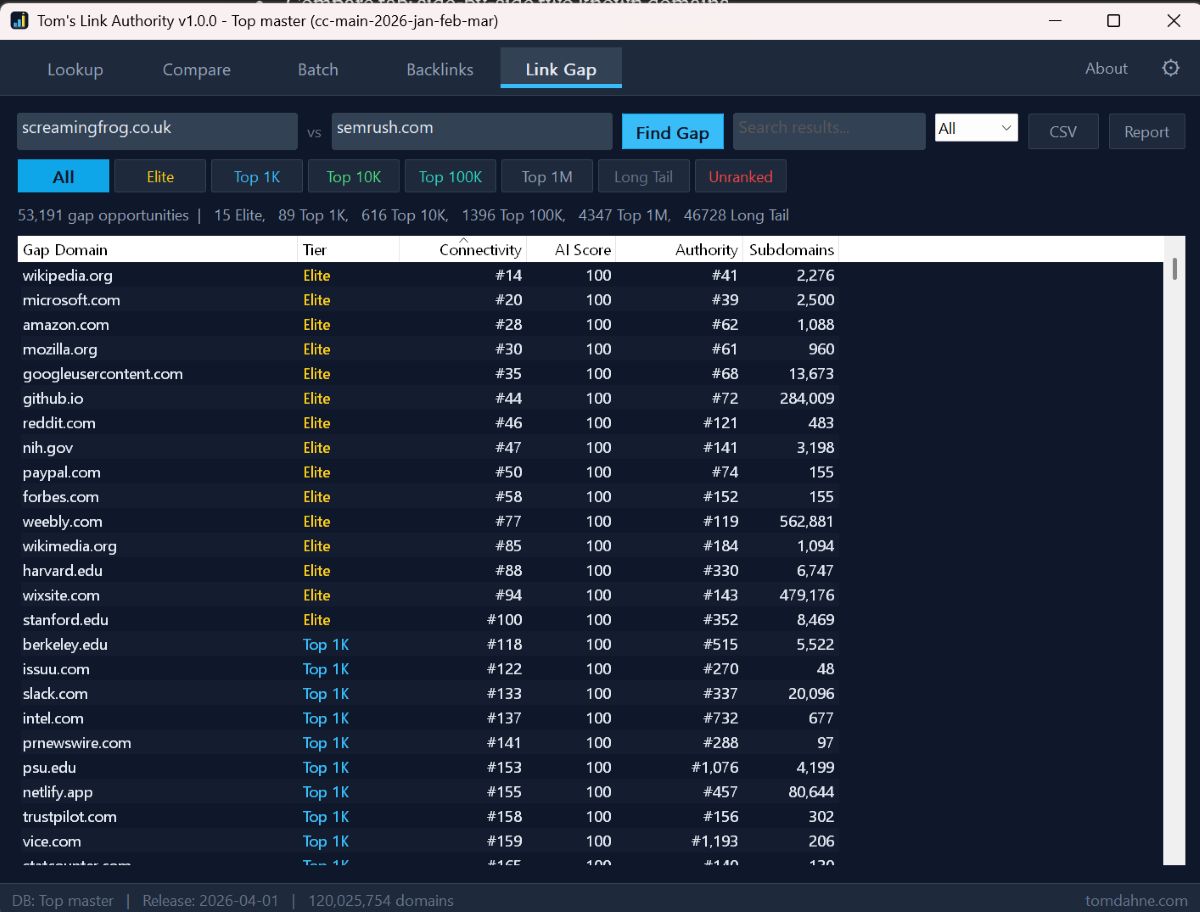
Link gap analysis identifies domains that link to your competitors but not to you — making them your highest-priority targets. Tom's Link Authority's Link Gap tab is built specifically for this. Enter multiple competitor domains alongside your own, and the tool surfaces the gaps automatically.
These targets have already demonstrated interest in your niche by linking to at least one competitor. They're pre-qualified in a way that cold prospecting can never replicate. And because the best ones link to multiple competitors, they're clearly not one-off mentions — they actively cover your space and are open to referencing relevant tools and content.
Prioritise link gap targets by two factors: the authority of the linking domain, and how many competitors they link to. A site that links to three of your direct competitors but not to you is a strong signal. A high-DA site that links to even one competitor is worth investigating regardless of gap count.
Building the Roadmap
The output of a thorough competitor backlink analysis is a prioritised plan with three tracks running in parallel — not a list of URLs sitting in a spreadsheet.
Track 1: Quick wins (action within one week). Directories, listing sites, and community profiles where you can get your tool mentioned with relatively little effort. These don't require original content or outreach campaigns. They require a submission, a profile, or a response to an existing thread.
Track 2: Content production (ongoing). The articles, guides, and tool pages that address the gaps you found in competitor content. These take longer but they're the foundations that earn links passively over time. Each piece you publish is another asset that can appear in someone else's backlink report six months from now.
Track 3: Outreach (longest lead time, highest payoff). The editorial sites, publications, and roundup pages where you need to make a case for inclusion. Build your outreach list from the competitor report, draft a personalised pitch for each target, and work through them methodically rather than in bulk blasts.
Running all three tracks simultaneously means you're always making progress somewhere, even when one track stalls. Quick wins keep momentum up while content takes time to rank. Content builds the asset base that makes outreach easier. Outreach builds the authority that brings passive links down the road.
Tools You Need for This Workflow
The entire workflow described here runs on free tools with no subscriptions. Tom's Link Authority handles the backlink data and link gap analysis from its local shard databases built from 4.4 billion Common Crawl link connections — no subscription required, works fully offline. Tom's Site Auditor handles technical SEO audits of both your site and competitor pages. Tom's AI Rank Checker gives you a Harmonic Centrality authority score for any domain across 120 million ranked domains — useful for quickly qualifying which backlink sources are worth prioritising.
For Spam Score checks on specific domains, a free bulk DA PA checker tool using the Moz API — such as the one at guestpostlinks.net — handles batch validation at no cost up to 100 URLs at a time. That's enough for most spot-checking needs without requiring a Moz subscription.
What Consistent Backlink Research Looks Like Over Time
The compounding effect of regular competitor backlink research is significant. Every time you run a report and work through it properly, your target list grows, your content backlog grows, and your understanding of your niche's linking landscape deepens. Patterns emerge. You start to recognise which publications cover your topic consistently, which communities are active and genuine, which directories are maintained and which are junk.
That accumulated knowledge is an advantage that's genuinely hard to replicate quickly. It's built one report at a time, over months of consistent research. The tools make it possible to do that research without paying per query or waiting for API rate limits. The discipline to actually work through what you find is what separates sites that inch forward from sites that compound.
Start with one competitor. Run the report. Spend an hour reading it properly with the four-category framework in mind. Build three lists: quick wins, content ideas, outreach targets. Then work the lists. That's the entire system.
Tip: Run a fresh competitor backlink report every quarter. Common Crawl data updates regularly, and competitors are always earning new links. What wasn't in the report three months ago might be your next best link opportunity today.
How Common Crawl Backlink Tools Compare
Several tools now use Common Crawl web graph data as their foundation, but they serve very different use cases. Tom's Link Authority is the only offline desktop option — no account, no cloud, no API calls, no subscription. The comparison below shows where each tool sits.
backlinks.sh is a developer-focused API returning up to 10,000 referring domains per call, priced at $0.01 per credit. It includes supplementary rankings from Majestic, Tranco, and OpenPageRank alongside the Common Crawl data, making it useful for developers building their own tools or integrations. It is not designed for manual SEO research workflows.
Citability is a cloud-based AI visibility scanner that indexes 607 million domains across 24 quarterly Common Crawl snapshots. It uses the same Harmonic Centrality authority metric that TLA uses, alongside PageRank. It targets teams tracking AI search visibility over time, with a subscription model and an account requirement.
Note: Domain counts vary across tools because they measure differently. TLA's 120 million reflects domains with meaningful Harmonic Centrality scores. backlinks.sh's 250 million includes all domains appearing in Common Crawl regardless of ranking. Citability's 607 million spans 24 quarterly snapshots combined. Different methodologies on the same underlying dataset — none is inflated, they're just counting different things.
| Tom's Link Authority | backlinks.sh | Citability | Ahrefs / Semrush | |
|---|---|---|---|---|
| Data source | Common Crawl | Common Crawl | Common Crawl | Proprietary crawler |
| Domains indexed | 120M ranked | 250M total | 607M (24 snapshots) | Proprietary |
| Results per lookup | Up to 100,000 | Up to 10,000 | Filtered browse | Plan dependent |
| Pricing | Free + $5/shard | $0.01/credit | Subscription | $99–$449/month |
| Works offline | ✅ Fully offline | ❌ API only | ❌ Cloud only | ❌ Cloud only |
| Account required | ❌ None | ✅ API key | ✅ Yes | ✅ Yes |
| Privacy | ✅ No data sent | ❌ API calls logged | ❌ Cloud | ❌ Cloud |
| Primary audience | SEO marketers | Developers | AI visibility teams | Agencies / teams |
| Link gap analysis | ✅ Built in | ❌ No | ❌ No | ✅ Yes (paid) |
The takeaway is that TLA and backlinks.sh are complementary rather than competing — a developer might use backlinks.sh to build an integration, while a marketer uses TLA to research and act. Citability sits in a different lane focused on AI visibility tracking over time. None of them replaces the others for their primary use case.
Summary
A competitor backlink report is the most information-dense SEO research document you can produce for free. The standard approach — scan for link targets and stop — wastes most of what's in it. The better approach is to read it as a map of your competitor's entire distribution strategy, categorise every link source into editorial, directory, community, or tool types, and extract action items from each category in parallel.
Combine that with a link gap analysis across multiple competitors and you have a roadmap that covers quick wins, content production, and outreach in a single research session. All of it can be done with offline tools that run on your machine, with no subscriptions and no data sent to external servers.
The work is systematic. The tools are free. The compounding effect is real.