- Key Takeaway
- Every “free” background remover charges you in something — daily limits, low-resolution exports, watermarks, upload privacy, or your time doing one image at a time. For occasional single-image use, online tools like remove.bg or Adobe Express work fine. For bulk workflows (eBay listings, product photography, content creation), an offline desktop tool that processes entire folders without uploads or subscriptions is faster, more private, and cheaper long-term than any cloud option.
Best Free Background Remover App (High Quality): Online vs Offline Tools (And What “Free” Really Costs)
People search for stuff like best free background remover app or free high quality background remover and expect one magical button that makes perfect cutouts every time.
Reality: there’s a tradeoff triangle you can’t escape — quality, privacy, and time. Most “free” tools quietly charge you in one of those.
Quick truth: If a website is removing your background for free, you’re paying with something else — usually limits, quality, uploads, watermarking, or your time.
What people mean by “free background remover tool”
When people say free background remover tool, they usually mean one of these:
- Online free tool: upload image → download PNG. Fast, but limited and not private.
- Freemium app: free tier with restrictions (export limits, low res, watermarks).
- Offline desktop app: runs on your PC (no upload), sometimes free, sometimes one-time payment.
- “Free” subscription trial: technically free for 7 days, then you forget and get billed.
If you want free high quality background remover results, the biggest thing isn’t the word “free” — it’s the quality of the AI model + the output resolution + how much control you get.
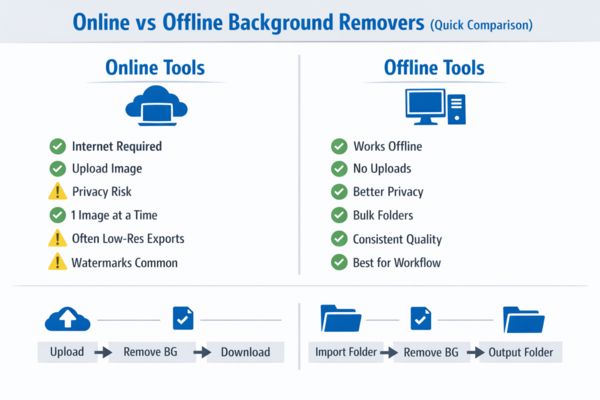 Online tools are quick, but offline tools win on privacy, speed, and bulk workflows.
Online background removers: fast, but you pay in limits
Online removers are popular because they’re frictionless. They’re also where most of the annoying stuff happens:
- Daily limits (e.g. 1–3 images per day)
- Low-resolution downloads unless you pay
- Watermarks
- Queue times / slow processing
- Quality drops on tricky edges (hair, fur, shadows)
- Privacy concerns (you’re uploading images to someone else’s server)
Online tools are usually built for “one image at a time”
This is the big difference most people don’t think about.
Many online tools handle one image at a time. That’s fine if you’re cutting out a profile pic.
If you’re doing product listings, eBay images, marketplace posts, or content creation, you’ll quickly want bulk background removal — and online tools start getting painful.
Offline background removers: better workflow + no uploading
An offline background remover app runs on your PC. That gives you some real advantages:
- Privacy: your images never leave your machine
- Speed: no upload time, no server queues
- Consistency: same output every time
- Bulk support: process whole folders
- Offline use: no internet required
Tip: If you’re removing backgrounds in bulk, the tool must support “process folder → output folder” properly. If it forces single-image processing, you’ll waste hours for no reason.
Bulk vs single-image background remover: which matters most?
This is where the real time savings comes in.
Single image (good for)
- Profile pics
- One-off product shots
- Occasional content creation
Bulk background remover (good for)
- eBay / Etsy / Marketplace listing batches
- Photos from market stalls
- Business inventory images
- Sticker packs / PNG assets
- YouTube thumbnail asset generation
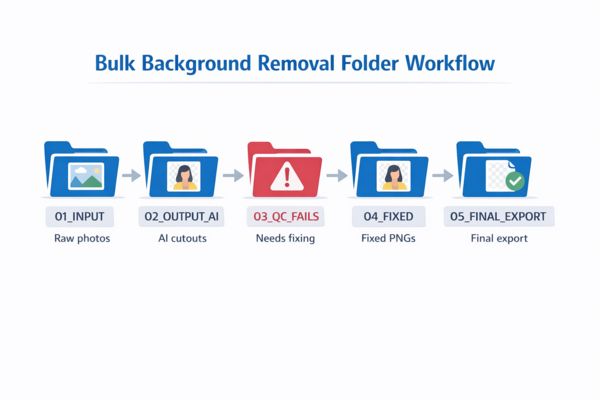 Bulk tools work like a pipeline: input folder → output folder → quality check.
Why “free” isn’t always the best move
I’m not against free tools — I love them. But you need to know what you’re signing up for.
The main problems with free background removers are:
- Export restrictions (low res, watermark, limited downloads)
- Low quality outputs when the AI model is weak
- No bulk tools so you manually grind through images
- No control for edge cases (hair/fur, holes, shadows)
- Privacy risk if uploads are stored or processed remotely
If you’re only removing backgrounds occasionally, a free tool is fine.
If you’re doing it weekly (or daily), free tools often become the slowest option — and your time is worth more than that.
Why monthly subscriptions are usually a waste of money
Subscriptions make sense for stuff that changes constantly — cloud storage, services with live infrastructure costs, etc.
But background removal? Most people don’t need it every month forever.
Typical subscription trap:
- You need background removal for a batch this week
- You pay monthly for “pro”
- You use it twice
- You forget to cancel
- They quietly drain your money for months
For most users, a one-time purchase or offline app is better value.
How to pick the best free background remover app (high quality)
If you’re deciding what to use, here’s the practical checklist:
- Edge quality: does it handle hair/fur cleanly?
- Resolution: does it export full quality PNG or downscale?
- Speed: can it process images quickly without waiting?
- Bulk support: can it do whole folders?
- Privacy: does it upload images or run offline?
- Cost model: free / one-time / subscription
Recommended workflow: free first, upgrade when it makes sense
My suggestion is simple:
- Start with a free background remover tool to test your needs.
- If you hit limits or waste time doing one image at a time, switch to a bulk workflow.
- Avoid subscriptions unless you genuinely use it every month.
- If privacy matters (it does for me), go offline.
Top background removers compared (2026 shortlist)
Here’s a shortlist of the most common background removers people actually use. This isn’t “best in the universe” stuff — just the tools that come up again and again and generally deliver decent results.
Note: ratings are based on real-world use cases (edge quality, export quality, bulk workflow, and whether the pricing model is annoying).
| Tool | Type | Quality | Bulk support | Pricing model | Privacy | Rating |
|---|---|---|---|---|---|---|
| remove.bg | Online | High (great edges) | Yes (paid/API) | Free preview + pay-per-credit / subscription | Uploads required | 8.5/10 |
| PhotoRoom | Online / App | High (product-focused) | Yes (strong for bulk workflows) | Free tier + subscription plans | Uploads/cloud workflow | 8/10 |
| Canva Background Remover | Online | Good (not always perfect edges) | Limited / depends on plan + workflow | Free test + mostly Pro subscription | Uploads required | 7/10 |
| Adobe Express | Online | Good (generally clean) | Limited (not built for folder pipelines) | Free plan + Premium subscription | Uploads required | 7.5/10 |
| Photopea | Online editor | Varies (depends on tool + manual edits) | Not true bulk (more manual workflow) | Free w/ ads + Premium option | Uploads/browser-based | 7/10 |
Most people don’t need 20 tools. Pick one that matches your workflow: single images vs bulk background removal.
Quick picks (no fluff)
- Best online quality: remove.bg (but credits/subscriptions get old fast).
- Best for sellers/product photos: PhotoRoom (built for listing workflows).
- Best “already using it anyway” option: Canva (handy, but subscription-based).
- Best basic free option: Adobe Express remove background.
- Best for manual control: Photopea (not true bulk, but handy for fixes).
Watch out: a lot of “free background remover” tools only export low-res images unless you pay. That’s fine for small web thumbnails, but useless for high quality PNG assets.
Want to do this workflow faster? My offline desktop app TomsBGRemover supports bulk background removal with clean PNG transparency export. No monthly subscription, no uploading — just a practical tool built for real-world batch jobs.