- Key Takeaway
- Link analysis maps the relationships between entities in an investigation — domains, people, IP addresses, organisations — to surface connections that raw data alone cannot reveal. Tom's OSINT Workbench provides free, offline link analysis and investigation case management for Windows, with a built-in visual graph, relationship mapping, and an integrated OSINT directory of investigative resources.
Link Analysis and Investigation Case Management: A Practical Guide
Intelligence analysis is not about collecting data. It is about understanding connections. A domain name is a data point. An IP address is a data point. A username, an email address, a company registration number — each one individually tells you something limited. What makes them useful is the relationships between them. When a domain and an unrelated-seeming organisation share the same registrant email address, that is a connection. When an IP address hosts twenty different domains, that pattern is a connection. When a username appears across platforms in ways that link a person to multiple identities, those links are the intelligence.
Link analysis is the discipline of making those connections explicit, visible, and navigable. It is a core technique in fraud investigation, cybersecurity threat intelligence, law enforcement intelligence work, corporate due diligence, and investigative journalism. This guide explains what link analysis is, why case management is essential alongside it, and how Tom's OSINT Workbench delivers both in a free, portable Windows desktop application.
What Is Link Analysis
Link analysis is a method of examining the relationships between entities — people, organisations, locations, events, objects, or digital assets — to identify patterns, clusters, hierarchies, and anomalies that would not be visible from looking at each entity in isolation. It is sometimes called relationship analysis, network analysis, or visual intelligence analysis, depending on the context.
In a typical investigation, link analysis helps answer questions like: who are the known associates of this individual? What infrastructure does this domain share with other suspicious domains? Which entities in this network are the most connected, and therefore the most significant? Are there indirect connections between two entities that appear unrelated at first glance? Which relationships are anomalous given what we know about the entities involved?
These are not questions you can answer by reading a data export or scrolling through a list of API results. They require a representation of the data that makes relationships visible — and that representation is the link analysis graph. A node graph, where entities are points and relationships are lines, allows an investigator to see the structure of a network at a glance, identify clusters and outliers, and follow chains of connection through multiple degrees of separation.
Link Analysis in Digital Investigations
In digital OSINT investigations, the entities being analysed are typically domains, IP addresses, email addresses, usernames, social profiles, organisations, and people. The relationships between them are the connections that OSINT data reveals: a domain registered to an email address, an IP address hosting multiple domains, a username appearing on multiple platforms, a certificate issued to a set of subdomains, a company linked to an individual through public records.
The value of link analysis becomes particularly clear in fraud and cybercrime investigations. Phishing campaigns, domain spoofing operations, and fraud networks often reuse infrastructure — the same registrant details, the same hosting IP, the same name server configuration — across dozens of separate-seeming domains. A link analysis graph that shows all of these domains connected through shared infrastructure makes the network immediately visible. Without the graph, the same data sitting in a spreadsheet looks like an unrelated collection of domains. With the graph, the network structure is obvious.
The same principle applies in corporate due diligence. A company that appears legitimate on the surface may share directors, addresses, or registration details with sanctioned entities or known fraud operations. Link analysis surfaces those connections. In threat intelligence, link analysis maps the relationships between threat actors, infrastructure, malware families, and victimised organisations. In missing persons investigations, it maps the relationships between known contacts, locations, social accounts, and communication patterns.
Why Case Management Matters
Link analysis without case management is like drawing a map with no way to save it. The analysis is only as good as your ability to maintain, revisit, and build upon it over time. Investigations are rarely completed in a single session. They develop over days or weeks as new information surfaces, new entities are identified, and the picture becomes clearer. Without a structured case management system, the findings from early in an investigation are easily lost, misattributed, or overwritten.
Good case management for investigations requires several things. First, isolation — each investigation should live in its own contained environment, separate from other cases, with no risk of data bleed. Second, an audit trail — every data point collected should be logged with a timestamp and a source, so that findings are reproducible and defensible. Third, structured entity management — entities should be typed and organised, not stored as freeform notes. Fourth, relationship tracking — the links between entities should be stored as structured data, not implied by proximity in a document. Fifth, portability — the case data should be exportable and shareable without requiring the recipient to have the same software or a cloud account.
Investigation case management software that provides all of these is rare at the free tier. Most professional case management platforms — Analyst's Notebook, Maltego, Palantir — are expensive enterprise tools. The gap between "free search tool with no case management" and "enterprise platform with a five-figure annual licence" is where most individual investigators and small teams find themselves underserved.
OSINT Workbench: Link Analysis and Case Management for Windows
Tom's OSINT Workbench addresses this gap with a free, portable, offline-first Windows desktop application that provides both link analysis and structured investigation case management. Every case is stored as a separate SQLite database on your local machine. Cases are fully isolated, fully portable, and entirely under your control.
Relationship Mapping
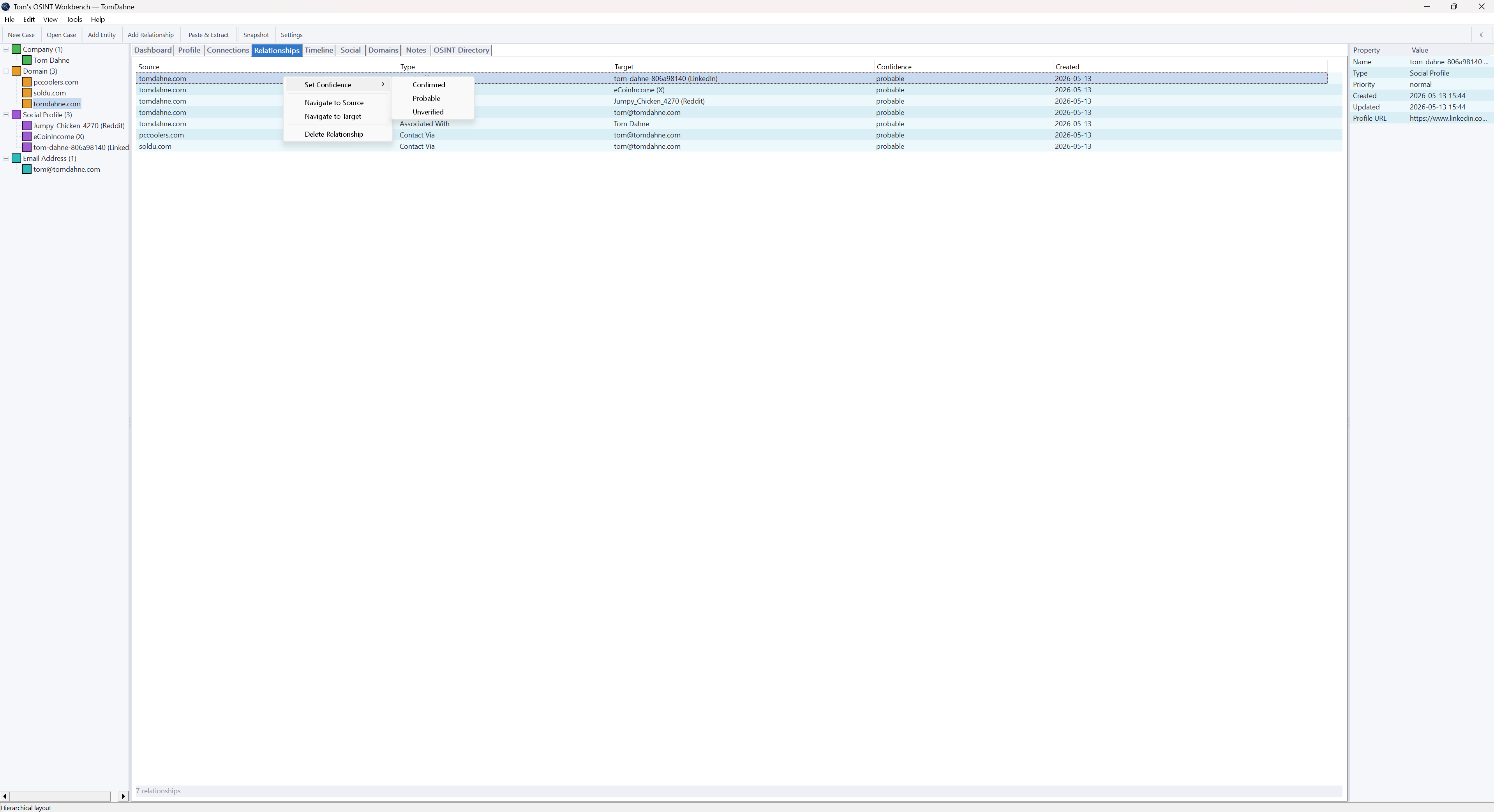
The relationships tab in OSINT Workbench displays all explicitly defined links between entities in the current case. Relationships are typed — "associated with", "contact via", "has profile", "hosted on", "registered to", and so on — giving each connection semantic meaning beyond a simple line on a graph. This matters for professional investigations where the nature of a relationship is as important as its existence.
Relationships in OSINT Workbench are built automatically where the data supports it — when a domain lookup reveals an email address, the link between domain and email is created automatically — and can also be added manually when an investigator identifies a connection that the data does not make explicit. This combination of automated and manual relationship building mirrors the real investigative workflow where data provides starting points and human analysis fills in the connections.
Visual Graph Analysis
The force-directed graph in OSINT Workbench renders all entities and their relationships as an interactive visual network. Nodes represent entities — colour-coded by type — and edges represent relationships. The graph updates in real time as new entities and links are added to the case. It opens in a dedicated pop-out window and supports both dark and light themes.
Force-directed layout means the graph organises itself based on the weight and density of connections. Highly connected entities — the ones that matter most in the network — naturally cluster at the centre. Peripheral entities fall to the edges. This self-organising behaviour makes it easier to identify the key nodes in a network without having to manually arrange the graph, which is a significant time saving in complex investigations with many entities.
The OSINT Directory
One of the more distinctive features of OSINT Workbench is its built-in OSINT directory — a curated reference of investigative resources, tools, and data sources accessible directly from within the application. Rather than maintaining a separate browser bookmarks folder or consulting an external reference site mid-investigation, investigators can access a structured directory of OSINT resources without leaving the tool.
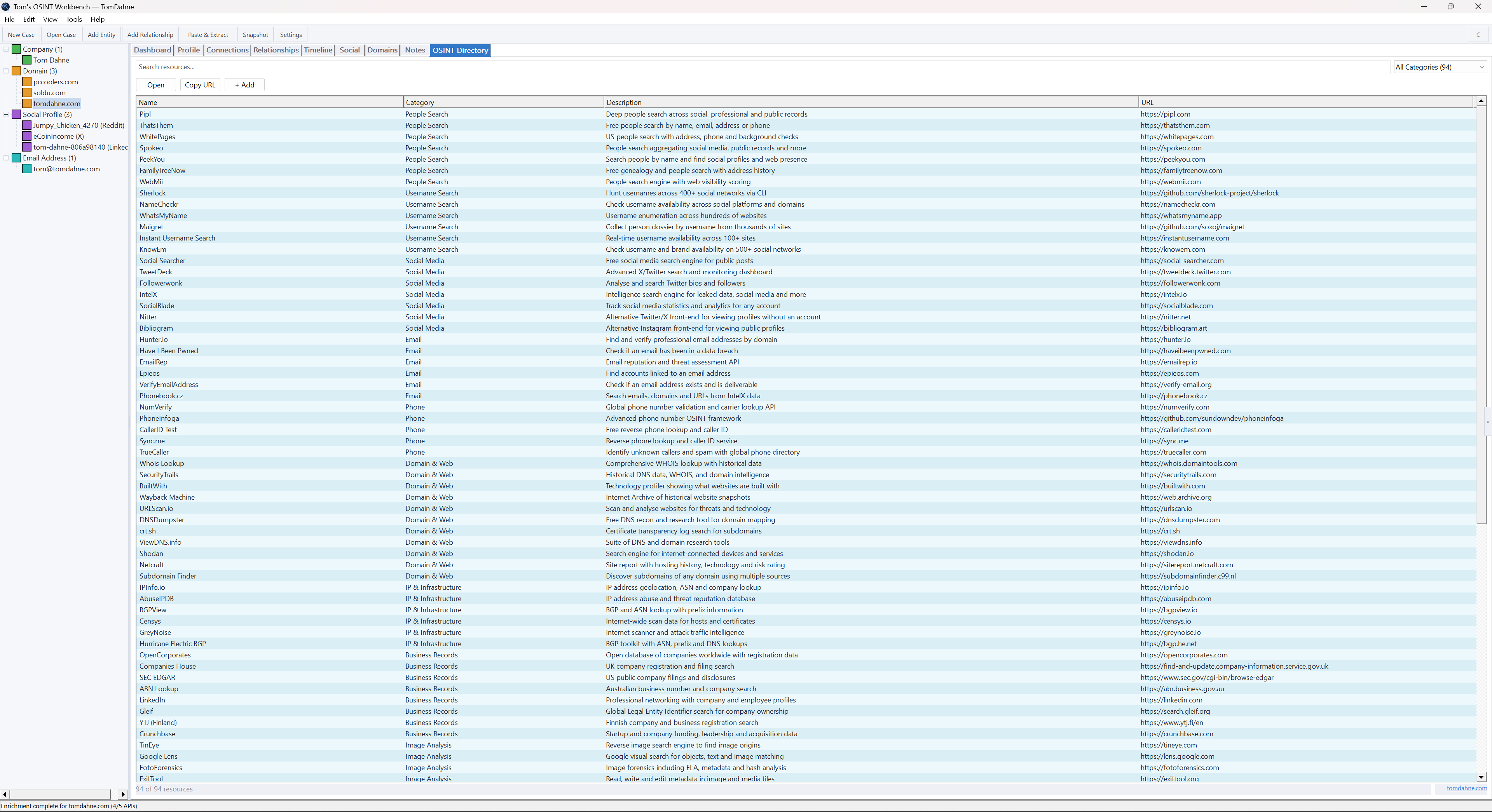
The directory covers a broad range of investigative resources — search tools, data sources, verification services, and analytical resources organised by category. For investigators building their methodology or looking for a specific type of data source during an active investigation, having this reference built into the tool rather than requiring a separate browser session is a practical productivity gain.
Intelligence Analysis Tools: What Sets Workbench Apart
The intelligence analysis software market is split between expensive enterprise platforms and free tools that are either too narrow in scope or too technically demanding for non-developer users. OSINT Workbench occupies a distinct position: a free, capable, native Windows application with a graphical interface that requires no technical setup and no ongoing cost.
Compared to IBM i2 Analyst's Notebook — the benchmark enterprise tool for link analysis — OSINT Workbench does not have the depth of analytical features, the data integration ecosystem, or the collaboration capabilities of an enterprise platform. But i2 Analyst's Notebook costs thousands of dollars per seat per year. For individual investigators and small teams, that comparison is academic. OSINT Workbench covers the core link analysis and case management workflow at zero cost.
Compared to Maltego — the other benchmark for graph-based OSINT — OSINT Workbench has no commercial transform marketplace, but it also has no usage limits, no account requirement, and no locked features at any tier. The free Community Edition of Maltego restricts the number of entities per graph and requires registration. OSINT Workbench imposes no such restrictions.
Compared to browser-based investigation tools, OSINT Workbench stores all case data locally, works fully offline for case management, and does not require a subscription at any level. For investigators who prioritise data security and operational privacy, local-first architecture is not a minor detail — it is a fundamental requirement.
- Tip
- When building a link analysis graph in OSINT Workbench, start by adding your primary entity and running all available API lookups against it before adding secondary entities. This ensures the graph builds outward from a solid foundation rather than accumulating disconnected nodes that are harder to organise later.
Use Cases for Link Analysis and Case Management
Fraud investigation is one of the most common applications. Fraud networks rely on shared infrastructure — shared registrant details, shared hosting, shared payment accounts — that link apparently unrelated entities. Link analysis exposes these shared connections and makes the network structure visible. OSINT Workbench's domain lookups, RDAP queries, and entity linking provide the data collection foundation for this type of analysis.
Threat intelligence analysts use link analysis to map threat actor infrastructure — identifying clusters of domains, IP addresses, and tooling that belong to the same actor or campaign. The ability to build and maintain a case across multiple sessions, with a full audit trail of collected data, supports ongoing intelligence tracking over time.
Corporate due diligence professionals use relationship mapping to verify the legitimacy of counterparties — identifying connections between a company and its directors, related entities, and any adverse associations visible in public records. OSINT Workbench's structured case management and entity linking support this workflow without requiring an enterprise platform licence.
Law enforcement and licensed investigators use link analysis for person of interest investigations — mapping the known associates, locations, digital accounts, and infrastructure connected to a subject. The local-first, no-account architecture of OSINT Workbench is well suited to investigations where operational security is a requirement.
- Note
- OSINT Workbench is designed for investigations using public data sources. It is not a surveillance tool and does not access private, intercepted, or non-public data. All data collection is through publicly accessible APIs and public records.
Getting Started
OSINT Workbench is a single portable EXE — no installation, no dependencies, no account. Download it from tomdahne.com and run it on any Windows machine. Create a new case, add your first entity, and start building your investigation. The full user guide covers relationship management, graph navigation, the OSINT directory, and advanced case management techniques in detail.
Final Thoughts
Link analysis and investigation case management are not features you find in basic search tools. They are the capabilities that separate a serious investigation platform from a collection of lookups with nowhere to put the results. Tom's OSINT Workbench brings both to Windows investigators for free — no subscription, no account, no cloud dependency, no limits on case size or entity count.
Download OSINT Workbench Free →
If your investigations include website analysis, Tom's Site Auditor provides a full offline crawl and technical audit for any domain — portable, Windows-native, free trial available.